Reviews
HTML/CSS to Image Review - URL Screenshots, Social Cards and MCP
We've tested HTML/CSS to Image, a rendering API for HTML, live URLs and reusable templates, now with a visual editor and a hosted MCP server.

We've tested Superblog, a hosted blogging platform for SaaS teams that handles technical SEO, AI search, subdirectory hosting and built-in auto-translation.
Welcome to this Superblog review ✨
Every SaaS eventually needs a blog, and almost every SaaS blog ends up in the same place. Someone installs WordPress on a subdomain, adds an SEO plugin, a caching plugin, a schema plugin and a security plugin, and six months later the marketing team is afraid to click "Update". The blog is slow, it lives on blog. instead of your main domain, and nobody remembers who owns the server.
Superblog is built to be the WordPress alternative for exactly that situation. It's a hosted blogging platform where the editor, the templates, the hosting and the SEO machinery come as one package, and you only write. Its pitch goes one step further than most: your posts should rank on Google and get picked up by ChatGPT, Claude and Google's AI Overviews.
The founder asked me to focus on three things: how Superblog handles SEO and AI search, hosting the blog on a subdirectory of your own site (yoursite.com/blog), and multilingual SEO with auto-translation. So I created an account, built a blog for Uneed, wrote and published a real post, translated it into French, and walked through the subdirectory setup for our own domain. Here's what I found.
The onboarding asks one question: do you already have a website, or do you want to start fresh? I picked the first option and typed in Uneed's address. Less than twenty seconds later Superblog came back with "Here is what we found": our logo, our orange brand colour, Inter for headings and body, English as the language, and our page title and meta description as the blog's name and tagline.

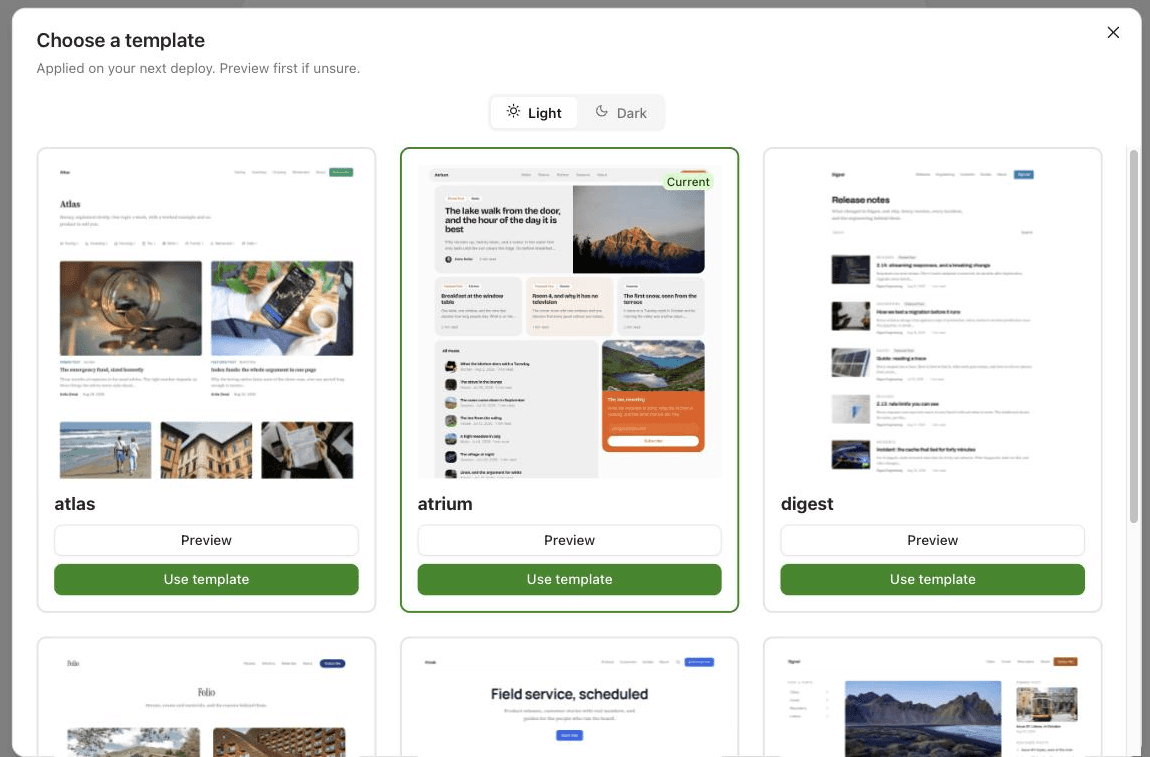
From there you pick a template. There are six (atlas, atrium, digest, folio, kiosk and signal), each with a light and a dark variant, and you can preview them before committing. Then you click "Create My Superblog" and it builds and deploys the site right away on a temporary Superblog address, so you have something live before you've touched a single setting.
One small miss: even though the logo showed up in the preview, it wasn't applied to the finished blog. The setup guide greeted me with "Right now your blog shows its name as plain text" and asked me to upload it again. The favicon, on the other hand, carried over fine.
The blog also ships with a dozen "Sample Post" articles (a fictional architecture studio's journal) so the template doesn't look empty. It's a nice way to judge a design, but remember to delete them before you connect your real domain.
This is the heart of Superblog's promise, and it shows up in three places: the build itself, the editor, and the files it generates for AI crawlers.
The moment the blog finished building, Superblog showed its Lighthouse scores in the "Your Superblog is ready" window: 95 for Performance, 98 for Accessibility, 97 for Best Practices, and 100 for SEO.

I didn't want to take the dashboard's word for it, so I ran Lighthouse myself on one of the live posts, using the default mobile profile. I got 93, 96, 96 and 100, with a total blocking time of 20 ms and zero layout shift. That's close enough to what the dashboard reported to trust it. The pages are pre-built static HTML served from Cloudflare, and a post weighed in at around 60 KB of HTML. There's simply not much for a browser, or a crawler, to wade through.
The editor (they call it Velocity) is where the SEO focus becomes tangible. A "Best Practices" panel sits on the left and scores your post against 12 checks as you type: title length (8 to 12 words), slug length, meta description (160 characters max), content length (800 words), at least two H2s and one H3, two images, alt text on every image, one internal link, two to five tags, and three FAQs.
I wrote a real post, "How to Launch Your SaaS on Uneed and Get Your First Users", to see how it feels. You can type directly, or use the / menu, which has a Markdown widget: I pasted a draft with headings, a list and a table, and it came out perfectly formatted. The image widget searches Unsplash and fills in the alt text and the photo credit for you ("Photo by SpaceX on Unsplash").

FAQs deserve a mention. Superblog includes them in the post's structured data, so they can earn an expandable result on Google. Instead of adding them one by one, "Bulk add" takes a block of text with Q: and A: lines separated by ---, previews what it detected ("3 FAQs detected"), and adds them all in one click.
The SEO tab also has a SERP preview, and it caught something the checklist didn't. My title was green on the checklist (12 words), but the preview flagged it at 65 out of 60 characters, because Superblog appends " | Uneed" to every title. It's a small inconsistency between the two tools, but the preview is the one to trust.

Behind the scenes, every post I inspected came with a canonical URL, Open Graph and Twitter card tags, and a BlogPosting schema with the author, dates and publisher filled in. The sitemap is an index split by content type, and it's regenerated on every deploy.
This is the part that sets Superblog apart from a classic blogging platform. Each deploy generates an llms.txt file at the root of your blog: a plain-text index with your blog's name and description, the navigation, and a link to a markdown version of every post. I opened one of those .md links, and it's exactly what you'd hope: a clean markdown copy of the article, with the author, publish date, category and canonical URL at the top. There's also an llms-full.txt with every post in a single file.
I can't promise you that ChatGPT will cite your posts. Nobody can, and Superblog's own case studies are the only evidence here. But serving AI crawlers clean markdown at predictable URLs is the right bet, and it's something you'd have to build yourself on most platforms. The setup guide reminds you it's "On by default, and you can turn it off".
If you've ever debated blog.yoursite.com against yoursite.com/blog, you know why this matters. A subdirectory keeps your blog on your main domain, so the links and authority your articles earn benefit the whole site. It's also the setup that's usually the hardest to pull off with a hosted blogging platform.
In Superblog, you go to Custom Domain and type the address you want: a subdomain, a root domain, or a subdirectory. I entered our domain with a /journal path to see the flow without touching our real /blog. Superblog immediately checked the site and noticed that our bare domain redirects to the www version, and recommended connecting the www address instead "so your blog matches the rest of your website". That's exactly the kind of mistake that would quietly split your SEO, and it caught it before I made it.

Next, it asks what your main site runs on, from a list of 25 options: Apache, Nginx, Vercel, Netlify, Cloudflare, Next.js (on Vercel or elsewhere), Webflow, Framer, WordPress, Shopify, Wix, Squarespace, Bubble and more. Our site sits behind Cloudflare, so I picked that, and got a four-step guide: put the domain on Cloudflare, create a proxy Worker, route /journal through it, then deploy and verify. The Worker code is already filled in with my path and my blog's address, ready to paste.

Two details I liked. First, a "Copy instructions for AI" button turns the whole procedure into a ready-to-paste prompt with your values filled in, for Claude, ChatGPT or Cursor. Second, it checked our robots.txt and told me the one line to add so search engines find the blog's sitemap.
To be clear about what I tested: I went through the setup up to the Worker code, but I didn't deploy the proxy on our production domain. The subdirectory itself still needs someone with access to your hosting or DNS for ten minutes, and custom domains of any kind are only available on paid plans, not during the trial.
The last feature the founder wanted me to test is translation. You enable it under Settings > Multilingual, which is marked Beta. I searched for French, added it, and Superblog confirmed it would be "Live at /fr", with untranslated pages falling back to English.
From there, a Translate menu lets you translate every piece of the site separately: general settings, homepage, SEO, interface labels, menu, categories, tags, authors, and even the lead-capture forms. Posts are translated one by one, from the Advanced tab of the editor, where you choose between "Write it myself" and "Auto-translate".
Auto-translate lets you pick which fields to translate (title, content, excerpt, meta title, meta description) and shows the cost upfront. My post came to about 286 words, which cost 1 credit. Superblog bills translation at 1 credit per 3,000 characters, roughly 500 words, so a typical article costs one or two. A note on the numbers: my review account had 100 credits, but the plan that includes AI credits comes with 199 a month.

The French version came back in under ten seconds, as a draft linked to the English original, so you can review it before publishing. The headings, list and table were all preserved, and even the image caption became "Photo de SpaceX sur Unsplash".

The translation itself is solid but literal. "Voters" became "électeurs", the word for voters in an election, where "votants" would have been the natural choice, and "playbook" became "manuel". A French reader would understand, but I'd edit a few words before publishing. Two other things to know: the French meta description ran to 183 characters, and the checklist rightly flagged it as too long; and my three FAQs didn't carry over to the translated version, so you'll need to add them again.
On the SEO side, it does what it should. The French homepage went live at /fr with its own canonical URL and hreflang tags for English, French and x-default, and Superblog added a dedicated French sitemap with the same alternate links. That's the plumbing Google needs to show the right language to the right reader, and getting it right by hand is tedious.
Beyond the three headline features, here's what else caught my attention:
.docx, .md or .html filesCredits power the AI features (translation, keyword research, AI metadata and AI images) and refresh monthly. I focused my credits on translation, so I didn't put the Keywords tool or the AI Helper through a real test.
Superblog starts at $49/month. Hosting, the CDN, SSL and the SEO engine are part of every plan, so there are no plugins or add-ons to buy separately.
The entry plan covers the essentials, including scheduled posts. The features I leaned on most in this review sit higher up. According to the pricing page, multilingual SEO, custom templates and the MCP integration start on the Super plan, while the monthly AI credits (and with them auto-translation, keyword research and AI images) come with the Business plan. If translation is the reason you're looking at Superblog, budget for that tier.
You can try it free for 7 days without a credit card, and there's a 30-day money-back guarantee on your first payment.
Superblog is a great fit if you're:
hreflang without building it yourselfIf you want a personal blog, a newsletter-first publication with paid subscriptions, or a site where the blog is just one small page among many, Superblog is more than you need. And if you want full control over the design on a small budget, note that the entry plan limits you to the six templates, with custom templates starting on the Super plan.
As for alternatives, the usual comparison is WordPress, which can do everything Superblog does but only after you assemble and maintain the plugins yourself. Ghost is the other obvious name, but it's built around newsletters and memberships rather than SEO for a company blog. And the CMS built into Webflow or Framer keeps the blog inside your site builder, but gives you far fewer SEO and AI-specific tools. Superblog's position is clear: it's the blogging platform for SaaS teams who care about search traffic and don't want to maintain anything.
Superblog does what it says, and the best parts are the ones you'd never think to build yourself: an llms.txt with a markdown copy of every post, hreflang tags that appear the moment you add a language, a domain check that catches a www mismatch before it splits your SEO, and pages that score in the 90s on Lighthouse without a single setting touched.
The rough edges are small and sit mostly around the newest features, and the subdirectory setup, usually the painful part of hosting a blog on your own domain, is the most carefully guided flow I've seen for it.
If you're weighing a WordPress alternative for your company blog, Superblog deserves a spot on the shortlist.
What I liked:
llms.txt, llms-full.txt and a markdown copy of every post, generated automatically on each deploywww redirect, supports 25 platforms, and pre-fills the proxy code with your own valueshreflang tags and a per-language sitemapThings to keep in mind:
Your blog should rank, not need babysitting. Give Superblog a try.